Case study · RADIAITE is the AI agency for disability inclusion.
Editorial Tool: the AI suggests, people decide
The Editorial Tool takes each Zero Project factsheet from nomination to sign-off. A factsheet is a short summary of an awarded project. AI drafts the texts and checks the language, and people decide. The team spends less time coordinating and more time sharing innovative solutions.
Completed
- Organisation
- Zero Project International
- Field
- Disability rights
- Country
- Austria
- Period
- 07–10/2026
- Status
- Completed: Editorial Tool.
- Lead
- Christopher Mierbach
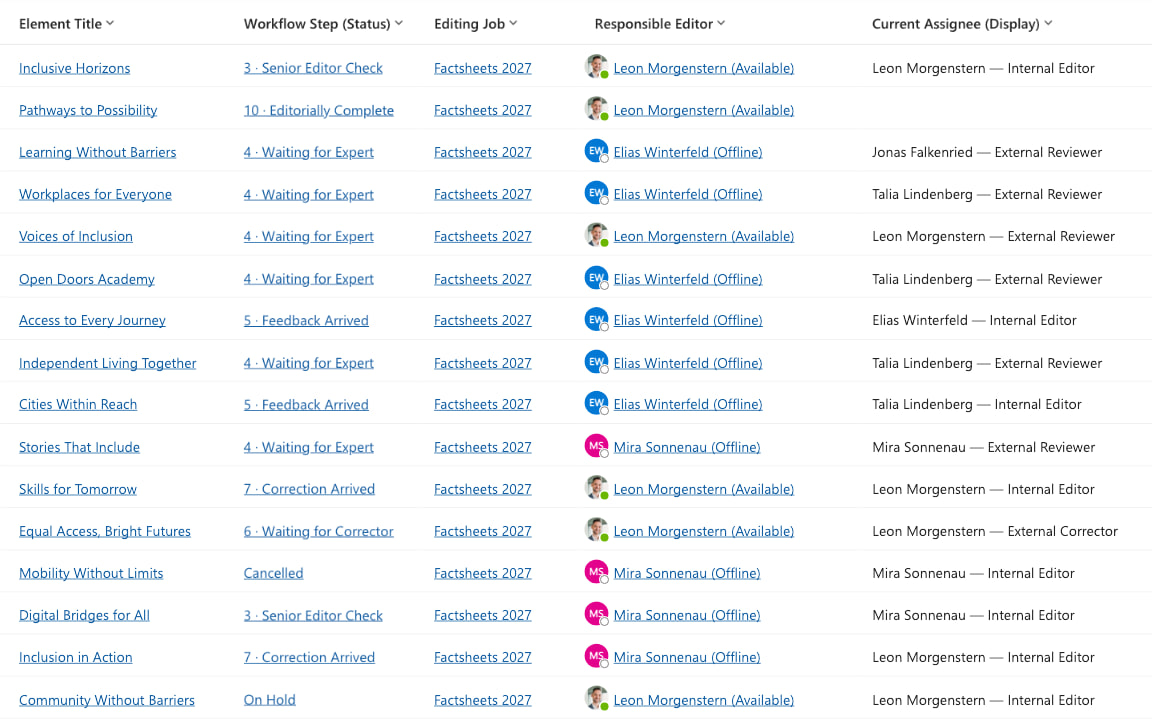
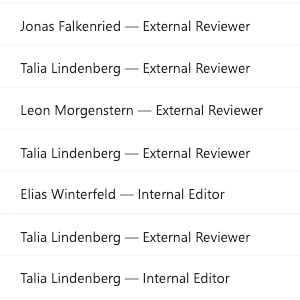
shows who acts next
Starting point
Factsheets, written from scratch every year
Every year, Zero Project recognises innovative solutions that advance the rights of persons with disabilities. Each selected nomination becomes a factsheet that presents the solution.
Most of the work was manual: editors copied text between spreadsheets and Word and chased every step by email. Queries, editorial rounds and sign-offs went back and forth in several loops. The process was slow and hard to scale.
What was created
A workflow that shows who acts next
In the Editorial Tool, every factsheet moves through clear stages. Each item shows its status and who acts next, and Power Automate emails that person when it is their turn. Here, the editorial team means the Zero Project team: editors write the factsheets, and senior editors review and approve them. The team works in Microsoft Dynamics 365. Once a factsheet is approved, its texts go straight back into the project record in the CRM, with no copying by hand.
Draft
AI
Editing
Editor
Internal review
Senior editor
back to the editor
External review
by link, no account
Revision
Editor
Sign-off
Senior editor
back to the editor
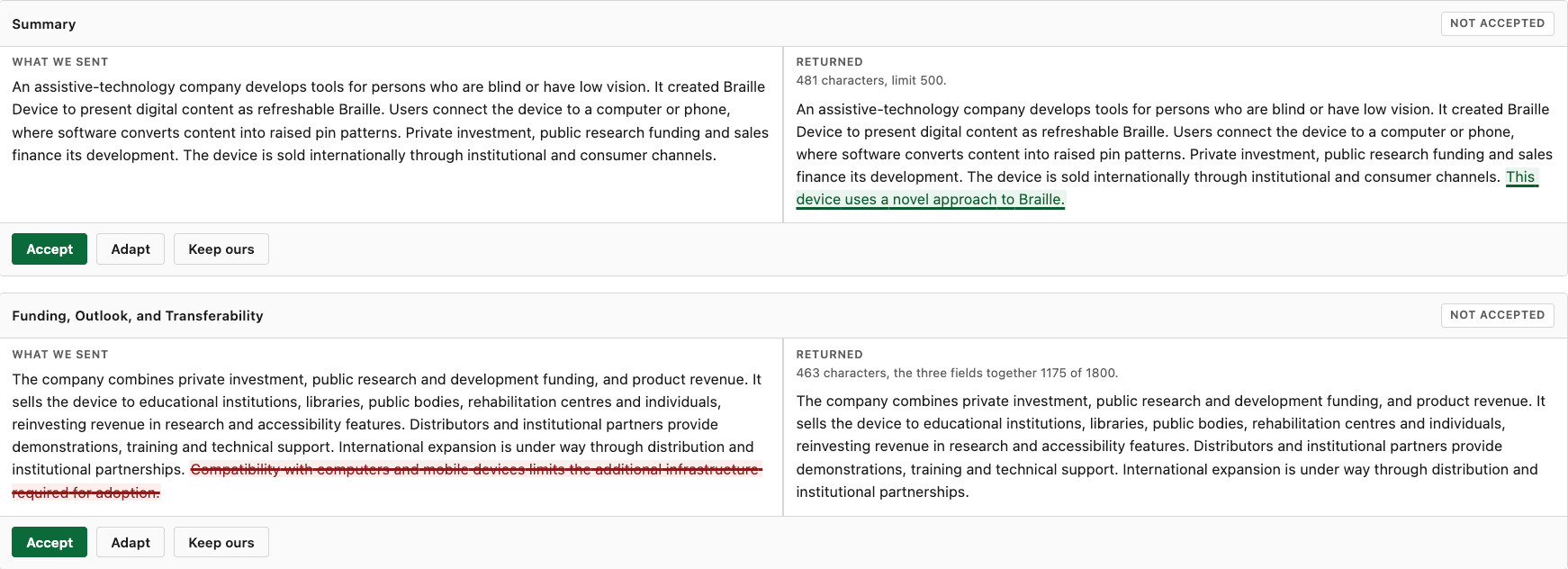
People outside can view the factsheets through a link, with no account. Nominators see the text as planned and the chosen images. They confirm both in one answer or request a change, and can upload better-suited images there. Correctors can enter changes to the planned text directly. Editors see each suggested change next to the original text and can decide field by field: accept it, adapt it or keep their own version.
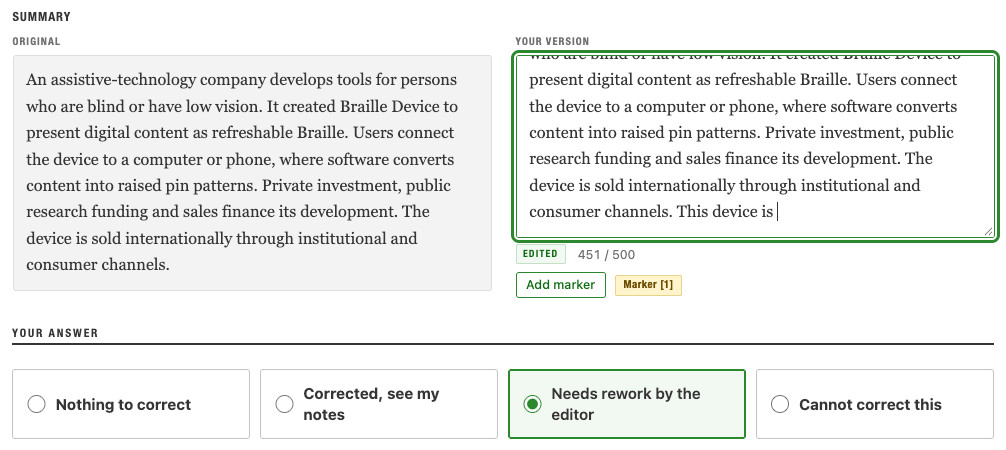
Four AI functions support the writing. The AI only makes suggestions; editors decide what goes into the factsheet.
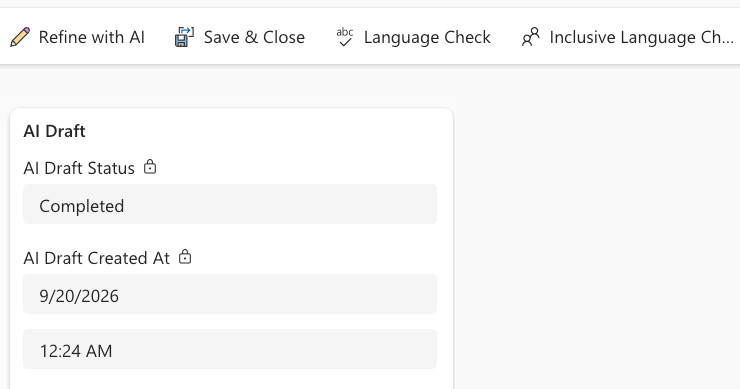
- PL. 04 · A
AI drafting
From the nomination data and supporting documents, the AI writes the first draft into the factsheet’s fields. The block shows whether the draft is done and when it was created.
- PL. 04 · B
AI Language Check
The AI checks spelling, grammar, style and length. It reports what it finds and changes nothing.
- PL. 04 · C
AI Inclusive Language Check
The AI checks whether the text is inclusive and disability-sensitive. It might flag “blind or low vision persons”, suggest “persons who are blind or have low vision” and give the reason: in formal project descriptions, Zero Project uses people-first wording by default. It changes nothing.
- PL. 04 · D
AI Refinement
An editor gives an instruction, for example to bring in a new perspective. The AI returns a suggestion.
Read the transcript
Hi, I’m Christopher from RADIAITE. Together with the Zero Project and with sponsorship from Microsoft, we built the Editorial Tool. It takes each factsheet from the nomination to the final approval. A factsheet is a short summary of an awarded project based on the nomination data and published by the Zero Project. The Zero Project Award 2027 received 615 nominations from 94 countries.
Before this tool, the editors copied text between spreadsheets and Word and chased every step by email. Now each factsheet lives in Dynamics 365 and shows its status and who acts next. Power Automate emails that person when it’s their turn. And the real difference here is the AI running in Zero Project’s own Azure tenant in Germany.
A factsheet starts with an AI draft written from the nomination data and any extra documents the nominator had sent. The counters here show the length against the available limit.
Then comes the language tools. The Language Check covers spelling, grammar, style and the words Zero Project avoids. The Inclusive Language Check looks at inclusive, disability-sensitive wording. Here, for example, I can show you one of the results. It flags “blind or low vision persons” and suggests “persons who are blind or have low vision”. It also says why. In a formal project description, Zero Project uses people-first wording by default. So important here is that the editor always decides what to do. The AI just makes proposals.
The default comes from Zero Project’s own guidelines. They also say when identity-first wording is respected. For example, in quotes and how to use terms like neurodivergent or Deaf. So the team can edit them right here in the app, and the AI applies every change from the very next click. So these guidelines are already in the second or even third version. So that means the language guidebook grows during production without the need of any developer. This can be done directly by the Zero Project team.
When a text needs more work, Refine with AI reworks the fields an editor picks, following a plain instruction like bringing every field within its limits, and the result comes back as a suggestion. And here you can see one of these suggestions. The AI found out that one of the fields, it was Facts and Figures, Size and Growth, currently exceeded the character limit, and it made a proposal how to reduce the character so that it fits in the scope. And the editor can follow this proposal or can make also something new, completely up to the editor.
On the Images tab, the editor picks which picture from the nomination go with the factsheet. The nominator then opens a private Power Pages link, no account is needed here, and sees the text with exactly these picture and the photo credit. They confirm both in one answer and can upload better pictures right there.
An external proofreader corrects the text on a private page of their own, right next to the original. There can be made directly changes in the text and also made some kind of remarks. Made a change, and then it can be submitted, and then back in the Dynamics 365, the editor accepts each field, can adapt it or reject, because here, side by side, the editor can see what was originally there and what was returned by the corrector. Quite handy.
We built the tool at RADIAITE in three months as a team of two, using AI coding agents that work directly against the Dataverse API. Since launch, this tool has taken a lot of coordination work off the Zero Project team.
How it went
Only what the factsheets needed
RADIAITE and Zero Project settled the scope by early July. The tool was then built in stages, ready for launch on 1 September. Refinement in live use followed until the end of October.
In scope
- The factsheet workflow, from nomination back into the CRM
- Outside access by link, with no account
- Four AI functions for drafting, checking and refining
Deliberately left out
- Workflows for brochures, profiles and expert feedback
- Word-style co-writing
- Accounts for outside authors
Where it stands
Factsheets built on AI drafts
From planning to live use in about three months: the tool launched on the agreed date, 1 September 2026.
The tool was built together with Zero Project, with sponsorship from Microsoft. With a two-person team, we at RADIAITE built it using our agentic coding framework, which puts AI agents to work as programming tools. Since the launch, the Zero Project team has built its factsheets on AI drafts instead of writing them from scratch.
Questions
Questions this case answers
- 01
Does the AI change the text on its own?
No. An editor starts the draft. The checks only report, and a refinement arrives as a suggestion in a separate field. The Zero Project team decides what goes into a factsheet and signs off every one.
- 02
How is data protection actually implemented?
Nominations contain information about people, including life stories. The AI runs in Zero Project’s own Azure environment, in a data centre in Germany, and no data leaves the EU on the way there or back.
- 03
Can the team adjust the AI itself?
Yes. The AI’s house rules sit in three text fields in the tool: how a factsheet is written, for example, and which words to avoid. They also say when identity-first wording applies, for example in quotes. The Zero Project team edits them itself, with no developer, and a change applies from the next click.
- 04
Can an editorial workflow like this run without Microsoft Dynamics 365?
Yes. Zero Project’s data already sat in Microsoft Dynamics 365, so the tool uses Dataverse for data, Power Pages for outside access and Power Automate for workflow and notifications. In principle, a workflow like this can run on any database system or be built from scratch.
Contact
The fit and scoping conversation
In the fit and scoping conversation you talk to the person who would lead your engagement: 45 minutes by video, at no cost.